










RollXO Casino App in Australia: Installing on iPhone and Android, the Web App, the APK and Playing on Mobile
Does RollXO have an app? Sort of. The casino runs an install page for Android and iPhone, but what you get is a web app that lives on the home screen, plus an Android file offered from the casino's own site. Reviews describe it differently, from "no dedicated app" to "native apps", so this page explains what is actually on offer and how to set it up safely.
Play RollXO on your phone with 100 welcome spins
RollXO App: 1 Install Page, 2 Ways to Get It
The casino's own site has an install page titled for Android and iPhone downloads. Pokies.casino, which tested the casino from Australia, describes a progressive web app that runs in the browser with no download needed, plus an APK for Android offered from the casino site that turned out identical to the mobile version. Wizard of Odds lists no dedicated app, while CasinosHub mentions iOS and Android apps.
The practical result is the same either way, and for most RollXO players the web app is the simpler choice. You get the full lobby, cashier and promotions on your phone, in a window that opens from a home screen icon. We found no review confirming a listing in the App Store or Google Play, so treat any store app using the RollXO name with caution. Checked in October 2026.
Install RollXO on iPhone in 3 Steps
| Step | iPhone (Safari) | Android (Chrome) |
|---|---|---|
| 1 | open RollXO from your saved bookmark | open RollXO from your saved bookmark |
| 2 | tap Share | tap the three dot menu |
| 3 | choose Add to Home Screen | choose Add to Home screen or Install app |
Standard browser steps for a web app; menu wording varies slightly between phone and browser versions.
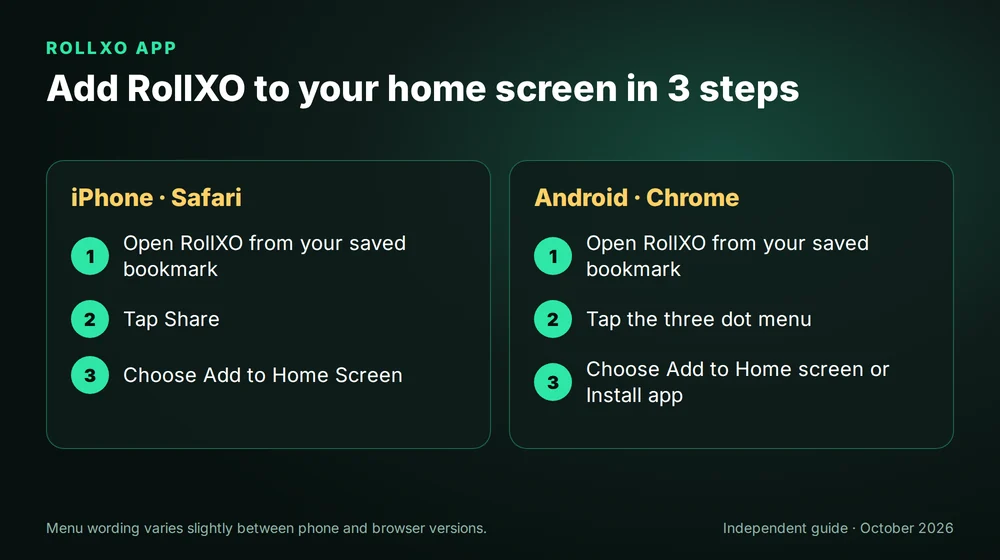
That is the whole process on an iPhone. The icon behaves like an app, opens without an address bar and always leads to the address you saved, which removes the risk of typing a lookalike domain on a small keyboard.
RollXO on Android: 2 Options
Android users can add the web app the same way or install the APK from the casino's own install page. Pokies.casino found the APK identical to the mobile site, so there is little reason to prefer it. If you do install it, download only from the casino's install page reached through your saved address, never from a file sharing site, and switch the unknown sources permission back off once the install is complete, so that nothing else can slip onto the phone later without you noticing.
4 Safety Rules for Casino Downloads
- Only the casino's own page. Copies of casino apps on third party sites can carry malware or record logins.
- Check permissions. A casino app has no reason to read your messages, contacts or other apps.
- Lock the phone. A saved login on an unlocked phone is an open wallet, so use a code, a fingerprint or face unlock.
- Remove what you do not use. Delete an old APK if you switch to the web app.
Add RollXO to your home screen and sign in
What Works on a Phone: 7,000+ Games and the Cashier
| Feature | On mobile |
|---|---|
| Pokies | full lobby, touch controls, demo mode on many games |
| Live casino | dealer streams and game shows |
| Instant win | crash, Aviator and Plinko style games |
| Sportsbook | AFL, NRL, cricket and esports, live betting |
| Cashier | deposits, withdrawals, bonus codes |
| Support | live chat at any hour |
Features as described by pokies.casino and CasinosHub for the mobile site.
Portrait mode suits most RollXO pokies, since the spin button and bet controls on modern titles sit within easy reach of a thumb. Turn the phone sideways for live tables and sports markets, where the extra width makes the betting grid and the odds easier to read. Wi-Fi is the better choice for live streams. They use far more data than pokies.
Mobile Deposits from A$30 and Faster Payouts
Cards, Neosurf, MiFinity and crypto all work from the RollXO mobile cashier, starting at A$30, and CasinosHub also lists Apple Pay and Google Pay. Cards and vouchers cannot take a withdrawal, so add MiFinity or a crypto wallet on your phone if you want the quickest payouts. The welcome codes 1XO to 4XO and the weekly codes work exactly as on a computer, entered in the cashier before you pay; the full list is in every RollXO bonus code.
Verification can be done from the phone too, since the camera handles the ID photo and the selfie. The document list is in RollXO sign in and verification, and the casino as a whole is covered in the RollXO Australia home guide.
Deposit A$30 from your phone and claim code 1XO
RollXO App FAQ
Is there a RollXO app for iPhone?
RollXO offers an install page. On iPhone the result is a web app added to the home screen through Safari. We found no review confirming an App Store listing, so add the casino from its own site rather than searching the store.
Is the RollXO APK safe to install?
Pokies.casino reports that the APK on the casino's own install page is identical to the mobile site. Only download it from that page through your saved address, never from third party file sites, and switch unknown sources off afterwards.
Can I claim RollXO bonuses on mobile?
Yes. Codes 1XO to 4XO, the VIP code and the weekly codes all work in the mobile cashier. Enter the code before paying and keep bets at A$5 or less while a bonus is active.
Does the RollXO sportsbook work on a phone?
Yes. The sportsbook, including AFL, NRL, cricket and esports with live betting, runs on the same balance in the mobile version. Landscape mode makes live markets easier to follow on a small screen.
RollXO is for adults aged 18 and over.
A phone makes it easy to play anywhere, so set a time limit before each session and keep notifications from the casino switched off. Gambling Help Online: 1800 858 858.
This is an independent guide, not the casino itself.